

TL;DR:
- Effective retail fixture planning enhances sales without extra marketing by optimizing store layout and customer flow. Small retailers should treat layout as an ongoing process, using data and regular observation rather than just initial design. Combining software tools with on-site checks helps improve store performance and adapt to changing customer behaviors.
Retail fixture planning store layout is the strategic arrangement of physical fittings to direct customer flow, maximise product visibility, and convert footfall into sales. Get it right and your shop works harder without any extra marketing spend. Data-driven space optimisation delivers an average sales lift of 11.8% and a margin lift of 9.5% across evaluated store departments. That figure comes from the OPTIMUS framework and it applies to real shops, not theoretical models. This guide covers the principles, tools, and step-by-step process that small retailers and store planners need to make every square foot count.
What are the key principles of retail fixture planning store layout?
Store layout is a revenue strategy, not a design task. Every fixture placement decision either helps or hinders a shopper’s path to purchase. Understanding the core principles before you buy a single gondola or freestanding unit saves you from expensive rearrangements later.
The decompression zone
The decompression zone is the first 5–15 feet inside your store entrance. Shoppers use this space to orient themselves. They are not ready to engage with products here. Placing high-value merchandise or promotional fixtures in this zone wastes prime stock on distracted eyes.
Sightline management
Fixture height controls what shoppers can see from any point in the store. Tall fixtures block visibility of high-margin categories behind them. Keep perimeter fixtures taller for storage and display, and keep mid-floor units at eye level or below so shoppers can see across the floor.

Adjacency planning
Adjacency planning places complementary products within sightlines of each other. A customer buying pasta sauce who can immediately see pasta and parmesan will add both to their basket without a markdown incentive. This is one of the highest-return moves in visual merchandising techniques, and it costs nothing beyond thoughtful fixture placement.
Common fixture types
- Gondola shelving: double-sided, freestanding units suited to grid layouts and high-volume categories. Read more about gondola shelving roles before specifying height.
- Freestanding display units: flexible, moveable, and ideal for promotional or seasonal product changes.
- Display cabinets: used for high-value or security-sensitive items where controlled access matters.
- Wall-mounted shelving: maximises perimeter space and keeps the floor clear for traffic flow.
Layout types compared
| Layout type | Best suited to | Key advantage | Key drawback |
|---|---|---|---|
| Grid | Grocery, pharmacy, convenience | Maximises stock density and navigation | Can feel clinical and uninspiring |
| Loop / racetrack | Department stores, large format | Guides shoppers past all categories | Longer path may frustrate time-poor customers |
| Free-flow | Boutiques, gift shops, fashion | Encourages browsing and discovery | Harder to manage traffic and replenishment |
The grid layout suits high-frequency, destination-led shopping. The loop layout works when you want shoppers to encounter every category. Free-flow suits environments where discovery and dwell time drive sales.
Which tools support fixture layout planning and space optimisation?
Retail space optimisation now relies on software as much as intuition. The distinction between macro-space and micro-space planning is the starting point every store planner needs to understand.
Macro-space planning manages overall store layout and fixture placement. Micro-space planning, also called planogramming, optimises individual SKU placement to maximise sales per linear foot. Both levels must align or you end up with a planogram that does not fit the physical fixture in the store.
Software and data tools
Blue Yonder Floor Planning creates digital store layout twins using financial data and shopper behaviour simulation. It includes performance heatmapping and 3D visualisation so planners can test fixture arrangements before committing to physical changes. For smaller retailers without enterprise budgets, tools like Shelf Logic and SpacePlanning.cloud offer planogramming at accessible price points.
Foot traffic sensors and customer flow modelling add a layer of real-world data that no floor plan software can replicate on its own. Sensors from providers such as Dor or Density count entries, exits, and dwell times by zone. That data tells you whether your current fixture arrangement is pulling shoppers into secondary zones or leaving entire aisles unvisited.
| Tool type | What it measures | Output |
|---|---|---|
| Foot traffic sensors | Entry counts, dwell time by zone | Zone performance heatmap |
| Planogram software | SKU placement, shelf capacity | Shelf layout diagram |
| 3D floor planning | Fixture arrangement, sightlines | Virtual store walkthrough |
| Sales per linear foot | Revenue by shelf position | Category reallocation priorities |
Synchronising planogram changes with your floor plan prevents a common and costly error. Planogram and floor plan misalignment causes fittings to arrive on site that do not match the physical space after a remodel. Always update both documents together.
Pro Tip: Use a 3D virtual walkthrough or VR simulation to spot sightline issues and aisle bottlenecks before you build. Identifying a blocked sightline on screen costs nothing. Identifying it after installation costs a full day’s labour and lost sales.
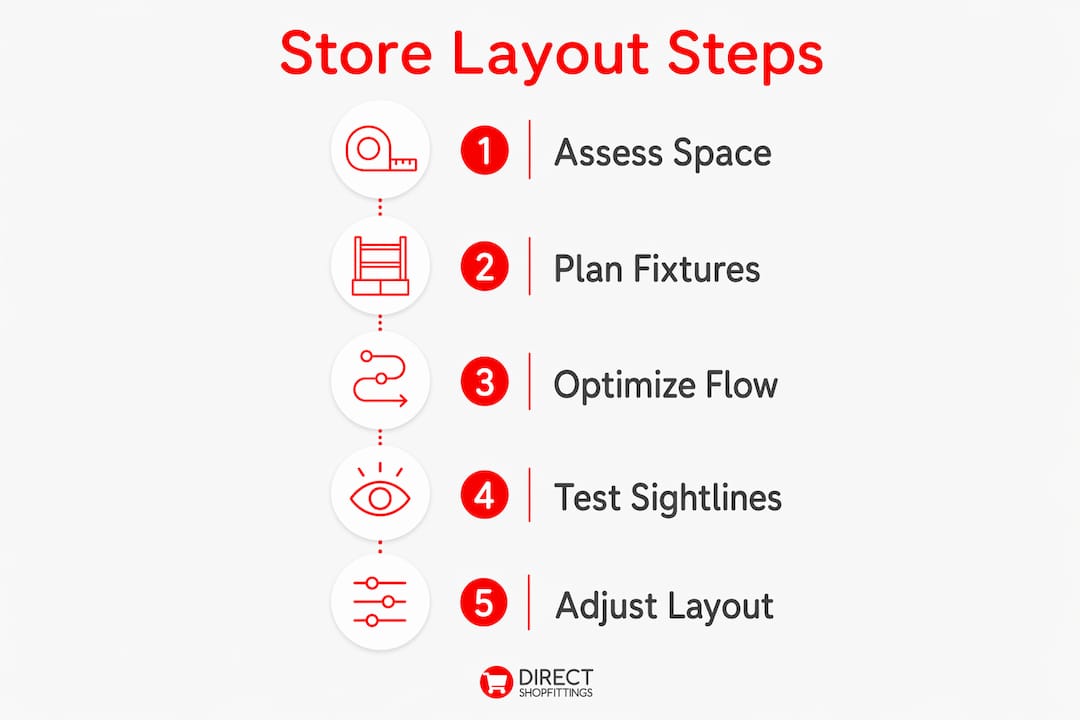
How do you plan a store layout with retail fixtures step by step?
Effective fixture layout planning follows a clear sequence. Skipping steps early creates problems that are expensive to fix later.
-
Define your store goals and brand positioning. A discount convenience shop and a premium gift boutique need completely different fixture strategies. Write down your average transaction value, your target customer, and your peak trading hours before touching a floor plan.
-
Map the customer journey. Mark the entrance, the decompression zone (5–15 feet in), the primary traffic path, and the checkout. These anchor points determine where every fixture goes.
-
Choose your layout type. Match the layout to your product mix and store format using the comparison above. A 400 sq ft gift shop suits free-flow. A 2,000 sq ft health and beauty shop suits a loop layout.
-
Select fixtures by category and sightline requirements. High-margin impulse items belong at eye level on mid-floor units. Bulky or heavy stock suits lower shelves on perimeter gondolas. Review your fixture type options before finalising the specification.
-
Apply adjacency planning. Group complementary categories within sightlines of each other. Place accessories next to the products they complement. This single step increases basket size without any promotional cost.
-
Run a virtual walkthrough. Walk the 3D model or printed floor plan from the entrance. Check for blocked sightlines, narrow aisle pinch points, and dead zones at the back of the store.
-
Finalise the floor plan and coordinate installation. Share the confirmed plan with your shopfitter and fixture supplier before delivery. Confirm fixture dimensions match the floor plan exactly.
-
Build in seasonal flexibility. Leave designated zones where fixtures can be swapped or repositioned for Christmas, summer, or back-to-school trading periods.
Pro Tip: Avoid filling every square foot at launch. Leaving breathing room in your layout lets you respond to what the sales data tells you in the first three months. Overcrowding at the start locks you into a configuration that may not suit your actual shoppers.
What common mistakes should small retailers avoid with fixture placement?
Small retailers repeat the same fixture planning errors. Knowing them in advance is the fastest way to avoid them.
- Over-merchandising the decompression zone. Shoppers who feel bombarded at the entrance disengage immediately. Use the first 5–15 feet to orient, not to sell.
- Ignoring sightline management. Tall mid-floor fixtures hide entire product categories. A shopper who cannot see a category from the aisle will not walk down it.
- Assuming a right-turn bias. Foot traffic data should inform layout decisions, not assumptions. Some stores see a clear left-turn pattern depending on entrance position and store shape.
- Overcrowding aisles. Packing aisles too densely creates a butt-brush effect where shoppers leave a category quickly when they feel physically crowded. Wider aisles increase dwell time and basket size.
- Using static 2D plans without validation. A flat floor plan cannot show you where a 1.8-metre gondola blocks the view of your best-selling category. Always test in 3D or on-site before finalising.
- Neglecting the checkout area. The till point is the last conversion opportunity in the store. A well-planned checkout display with impulse lines adds measurable revenue per transaction. See how counter displays benefit shop owners for practical ideas.
Pro Tip: Review your sales data by zone every quarter. A dead zone on your heatmap is not bad luck. It is a fixture placement problem with a fixable cause.
Common retail display mistakes compound over time if left unchecked. A single blocked sightline can suppress an entire category’s performance for months before anyone notices.
How do you measure and improve store layout performance over time?
Layout performance is measurable. The two most useful metrics are sales per square foot and sales per linear foot. Sales per square foot tells you how efficiently the overall floor space generates revenue. Sales per linear foot tells you which shelf positions and fixture runs are pulling their weight.
- Set a baseline. Record sales per square foot by zone before making any changes. This gives you a comparison point after each adjustment.
- Install foot traffic sensors. Map dwell time and movement patterns across zones. Compare high-traffic zones with low-sales zones. That gap is where your fixture placement is failing.
- Update planograms regularly. Refresh product placement in response to sales data rather than on a fixed annual cycle. Effective store designs balance primary pathways for fast movement with secondary discovery zones. Planogram updates keep those discovery zones performing.
- Test changes virtually before moving fixtures. Reconfiguring a gondola run costs time and disrupts trading. Run the change in your floor planning software first.
- Align layout reviews with seasonal buying cycles. Schedule a layout review in january before spring trading, and again in september before the Christmas period. Seasonal adjustments made early outperform reactive rearrangements made under pressure.
Key takeaways
Retail fixture planning store layout is a measurable revenue strategy, not a one-time design decision. The retailers who treat it as an ongoing discipline consistently outperform those who set and forget.
| Point | Details |
|---|---|
| Decompression zone | Keep the first 5–15 feet clear of heavy merchandising to let shoppers orient before engaging. |
| Adjacency planning | Place complementary products within sightlines to increase basket size without markdowns. |
| Sightline management | Keep mid-floor fixtures at eye level or below to prevent blocking high-margin categories. |
| Data-driven iteration | Use sales per square foot and foot traffic heatmaps to identify and fix underperforming zones. |
| Planogram alignment | Always synchronise planogram updates with floor plan fixture dimensions to avoid costly installation errors. |
What I have learned from watching small shops get layout wrong
Most small retailers treat fixture planning as a one-off task they do when they open and then never revisit. That is the single most expensive mistake I see. A layout that worked on opening day will not work two years later when your product mix has shifted, your customer base has changed, and your best-selling category has moved three times.
The shops that consistently perform well share one habit. They treat the floor plan as a live document. They look at their sales data by zone, they notice when a category goes quiet, and they move fixtures in response. They do not wait for a full refit.
Technology helps, but it does not replace walking the floor. I have seen planners produce beautiful 3D models that completely miss the fact that a fixture blocks natural light from the window, making an entire aisle feel uninviting. The best store planners combine software data with regular on-site observation.
Small retailers often assume that enterprise-level tools like Blue Yonder are out of reach. The principles behind those tools are not. Measuring sales per linear foot, mapping foot traffic manually with a tally counter, and sketching adjacency plans on paper all deliver the same insight at a fraction of the cost. Start with the principles. Add the technology when the budget allows.
The retailers who get this right do not have bigger budgets. They have better habits.
— Lee
How DirectShopfittings can support your store layout plans
Planning a store layout is only half the job. Getting the right fixtures, in the right sizes, delivered on time is where many small retailers hit problems.
DirectShopfittings supplies a wide range of retail fixtures and shelving solutions suited to small shops and growing retail chains alike. From gondola shelving and freestanding display units to display cabinets and wall-mounted systems, the range covers every layout type discussed in this guide. If you are starting from scratch, the shopfitting guide for small retailers is a practical starting point for understanding what you need and in what order. DirectShopfittings also offers guidance on fixture selection to match your floor plan, with fast delivery and a customer service team that retailers consistently praise for responsiveness. Browse the full range at DirectShopfittings to find fixtures that fit your layout and your budget.
FAQ
What is retail fixture planning?
Retail fixture planning is the process of selecting, positioning, and arranging physical display units within a store to guide customer flow and maximise sales. It covers fixture type, height, adjacency, and alignment with the overall store layout.
What is the decompression zone in a store layout?
The decompression zone is the first 5–15 feet inside the store entrance where shoppers orient themselves. Placing heavy merchandising here reduces engagement because shoppers are not yet ready to buy.
Which store layout works best for small shops?
Free-flow layouts suit small boutiques and gift shops because they encourage browsing and discovery. Grid layouts suit convenience and pharmacy formats where shoppers want fast, predictable navigation.
How do I measure whether my store layout is working?
Track sales per square foot by zone and use foot traffic data to identify dwell time patterns. A zone with high traffic but low sales signals a fixture placement or adjacency problem worth fixing.
How often should I update my store layout?
Review your layout at least twice a year, aligned with seasonal trading cycles. Use sales data and foot traffic heatmaps to identify underperforming zones and test changes virtually before moving physical fixtures.